












How can we help?
Reports: filters, customising and exporting
All reports live under the Report ▾ tab and work the same way: choose filters, click Search, then print, email or export the result. Reports are part of Premium.
Where to find it: Report ▾ (keyboard Alt + R opens the Sales report)
The reports
| Registers | Sales, Purchase, Sale Product Report, Purchase Product Report, Product Report, Stock Report. Sales and purchase registers · Stock reports |
| Money | Cashbook, Daybook, Company Ledger, Inward / Outward Payment, Daily Expenses, Other Income, Sale / Purchase Voucher. Cashbook · Day Book |
| Outstanding | Sale Outstanding, Purchase Outstanding, Company Outstanding, Pending Payment. Outstanding reports |
| Profit | Bill-wise, Day Wise, Customer Wise and Product Wise Profit & Loss. Profit reports |
| GST | GST Report, GSTR-1, GSTR-2B, GSTR-3B, E-Way Bill. GST Report |
| Documents | Other Documents, Other Document, Other Document Product, Manufacture. Document reports |
Filters
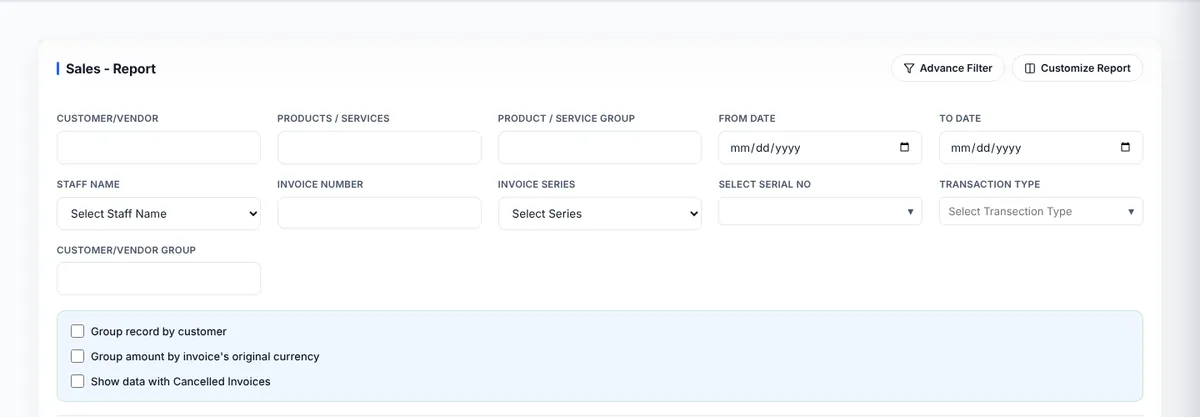
- Fill the filters you need — usually From Date and To Date, plus party, products, product group, staff, invoice number or series, and customer/vendor group.
- Click Advance Filter for more options, or to add your own conditions (field + contains / equals / starts with / ends with / greater than / less than + value).
- Click Search. Reset clears the filters. The − button folds the filter card away to give the results more room.
Choose the columns
Click Customize Report (or Customize Fields), tick the columns you want (Select All / Deselect All) and click Save Customization. The report remembers your layout next time.
Print, email and export
- Print opens a print-ready page with your business name and the report title.
- E-Mail / Send Mail sends the report by email.
- Export and Download save the report as a file (for example CSV) to open in Excel or share with your accountant.
Tip: The F.Y. selector in the top bar also limits reports to one financial year. Choose All Data to report across years. Financial year