












How can we help?
GST Report: output tax, input credit and net payable
The GST Report puts the GST on your sales (output tax) next to the GST on your purchases (input tax credit) and shows the difference you are likely to pay.
Where to find it: Report ▾ → GST Report
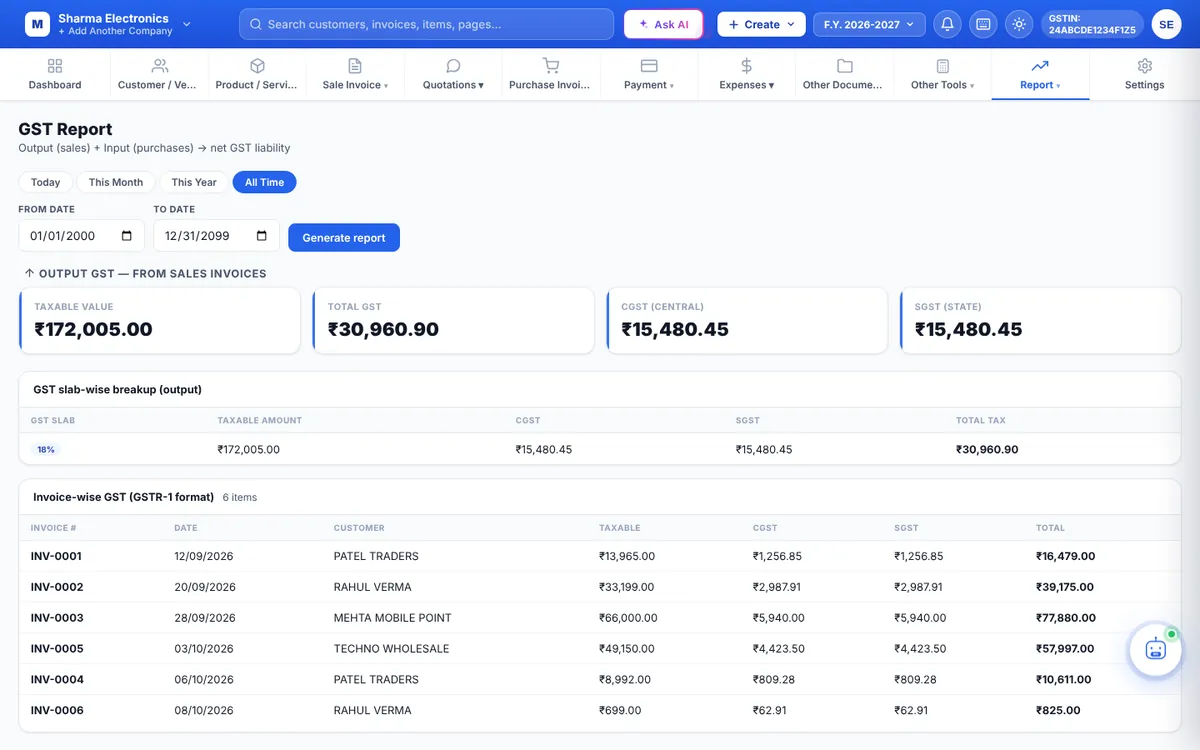
Run the report
- Click Today, This Month, This Year or All Time, or enter a From Date and To Date.
- Click Generate report.
What you see
| Output GST — from sales invoices | Taxable Value, Total GST, CGST and SGST for the period, then a slab-wise break-up (one row per GST rate) and an invoice-wise list with each invoice’s taxable value and tax. |
| Input GST — from purchase invoices (ITC) | Purchase Taxable, Total Input GST, CGST Credit and SGST Credit, with a slab-wise break-up and a bill-wise list. |
| Net GST liability | Net CGST Payable, Net SGST Payable and Total Net Payable = output GST − input GST. A negative figure means you have more credit than tax, which is carried forward. |
What is included
- Sale invoices dated in the period, except cancelled and deleted ones.
- Purchase invoices dated in the period, except deleted ones.
- Tax is taken from what was saved on each bill. To correct a figure, edit the bill.
This report shows the tax in CGST and SGST columns. For the IGST on inter-state sales and the split needed for your return, use GSTR-3B.
The GST Report is a guide. Verify the figures with your accountant before filing.