












How can we help?
Add items, discounts and additional charges on a bill
The Product Items and Amount Detail cards are the same on sale invoices, purchase invoices, quotations, orders, challans and notes. Here is everything you can do there.
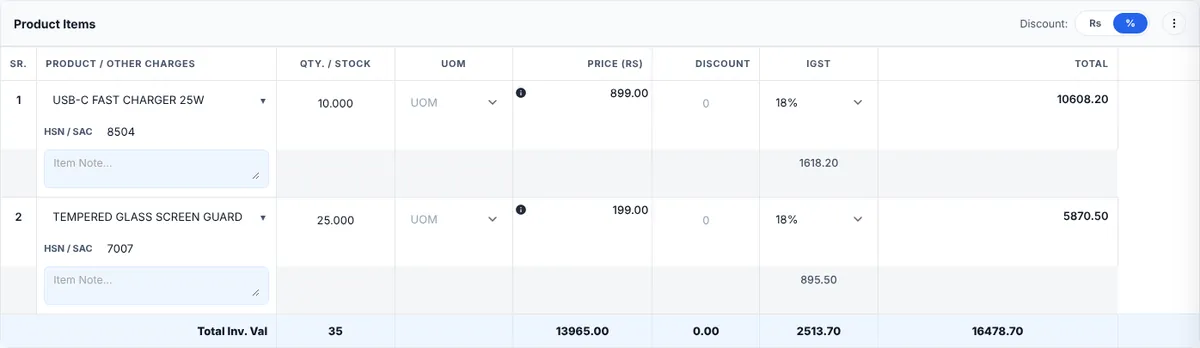
Item lines
- Pick a product: type part of the product name. The list shows HSN | Barcode No. | Qty. for each item so you pick the right one. To bill something not in your list, type its name and choose Custom item at the bottom.
- Item Note: the yellow box under the product name prints extra details (model, colour, warranty…) under that line.
- Qty. / Stock: the stock left is shown under the quantity, in red when low.
- Price (Rs): price before tax per unit.
- Tax column: the GST rate and the tax amount for the line.
- Green + adds a line after this one; red − removes the line.
Discounts
- Per item: use the Rs / % switch at the top of the card to choose whether line discounts are amounts or percentages, then type the discount on each line.
- On the whole bill: type an amount in Discount (₹) in the Amount Detail card.
- Default discounts and labels are set in General Options → Discount Setting.
Additional charges (freight, packing, installation…)
- In Amount Detail click + Add Additional Charge (or ⋮ → Add Additional Charges on the Product Items card to create a new type of charge).
- Pick the charge, enter the amount and whether it is taxable. It is added to the total taxable value and tax.
Round off
The Round Off switch rounds the grand total to whole rupees. The rounding method (nearest 1, 5, 10, round up or down…) is chosen in General Options.
Notes
- Terms & Condition / Additional Note is printed. Each note has a title and details; add more with + Add Notes. Default terms come from Terms and Conditions.
- Document Note / Remarks is for your team only and is never printed.