












How can we help?
Record payment while creating an invoice
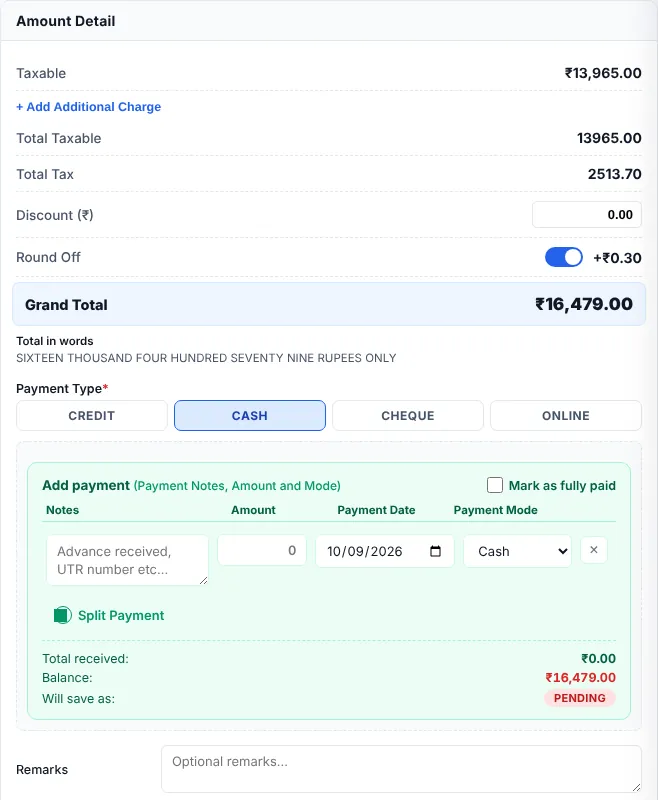
The Payment Type at the bottom of the invoice tells Billing Saathi whether the customer paid now or will pay later. It decides whether the bill shows as Paid, Partial or Pending.
Customer will pay later
Click CREDIT. The invoice is saved as Pending and appears in Sale Outstanding until you record the payment. Record a payment later
Customer pays now
- Click CASH, CHEQUE or ONLINE.
- To mark the whole amount as received, tick Mark as fully paid.
- Otherwise fill the payment row: Notes (for example UTR or cheque number), Amount, Payment Date and Payment Mode.
- Paid in two ways (for example part cash, part UPI)? Click Split Payment to add another row.
- Check Total received, Balance and Will save as (PAID, PARTIAL or PENDING), then save.
Good to know
- Money received on an invoice is recorded as an Inward Payment automatically (marked Received against invoice…), so your cashbook and day book stay correct.
- The invoice list shows the payment status and the amount still outstanding for every bill.