












How can we help?
Record a payment against an invoice later
When a customer pays a credit bill later, record the payment on the invoice. Its status changes to Partial or Paid and the outstanding amount goes down.
Steps
- Open Sale Invoice ▾ → All Sale Invoices (the Pending and Partial tabs show unpaid bills).
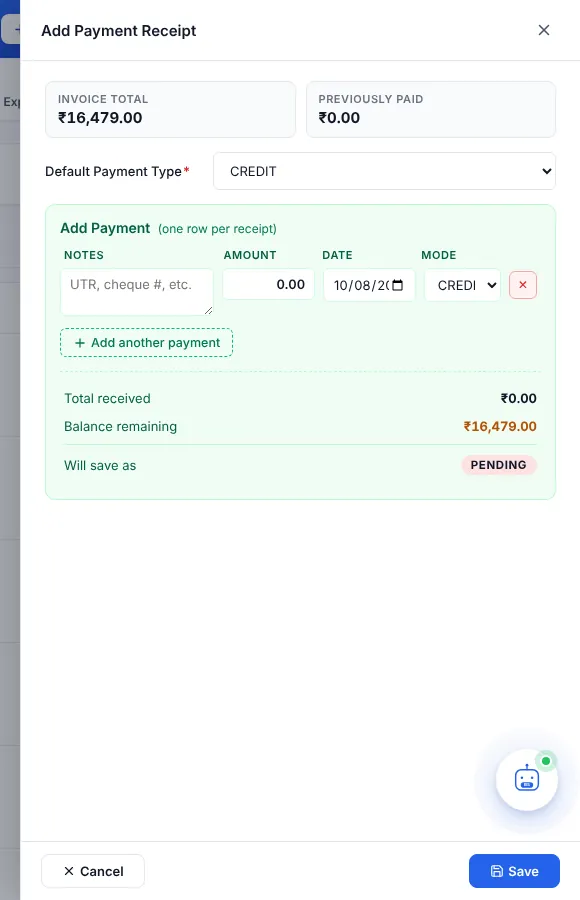
- In the Payment Type column, click the badge of the invoice (for example CREDIT). The Add Payment Receipt panel opens.
- At the top you see the Invoice Total and the amount Previously Paid.
- Choose the Default Payment Type (CASH, BANK, UPI, CHEQUE, CARD or ONLINE).
- Fill a payment row: Notes (UTR, cheque number…), Amount, Date and Mode. Click + Add another payment if the customer paid in parts.
- Check Total received, Balance remaining and Will save as (PAID, PARTIAL or PENDING), then click Save.
Payment not for one particular bill? If a customer pays an amount on account (for example against several bills, or in advance), record it in Inward Payment. It shows in the customer’s ledger.