












View, print, download and share an invoice
Every saved invoice can be previewed, printed, downloaded as PDF and shared with your customer in a few clicks.
Where to find it: All Sale Invoices → View / Print on the invoice row
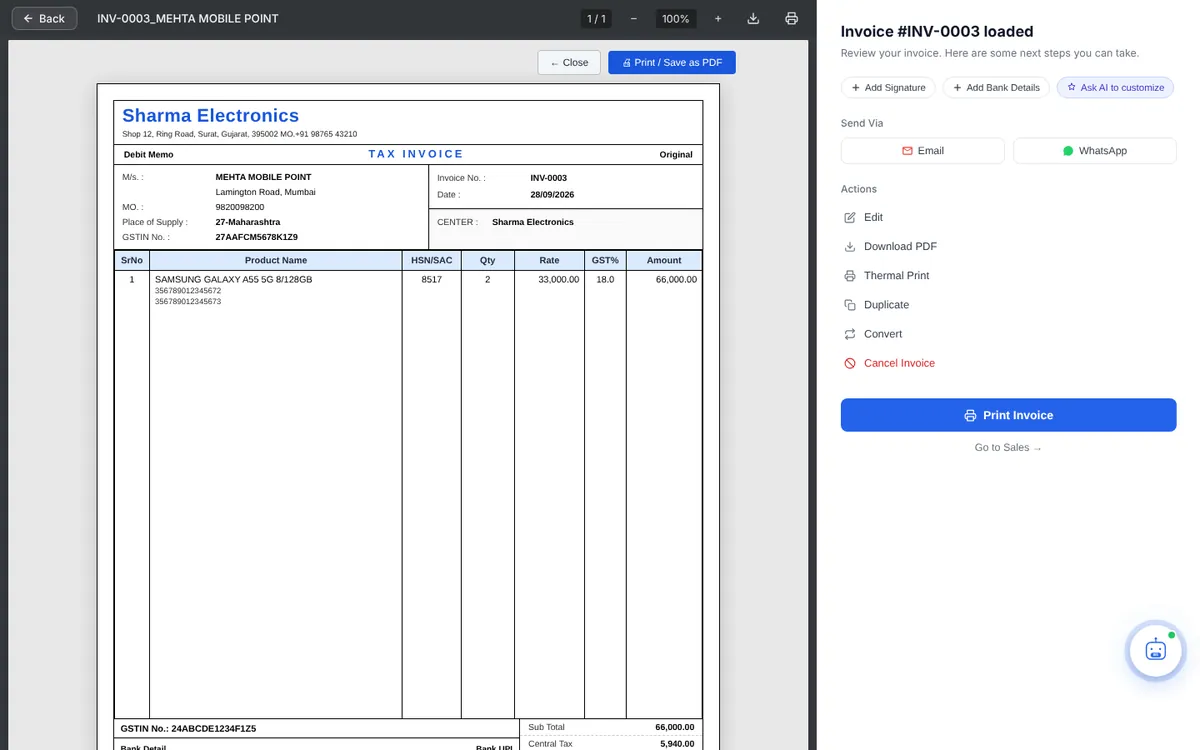
The preview window
The left side shows the invoice exactly as it will print. Use − / + to zoom. The right side has these options:
- Next steps: Add Signature, Add Bank Details and Ask AI to customize appear if something is missing on your invoice.
- Send Via: Email or WhatsApp.
- Actions: Edit, Download PDF, Thermal Print and Cancel Invoice.
- Print Invoice opens your browser’s print window.
- Click Print Invoice (or Print / Save as PDF above the invoice).
- Choose your printer and print. To save a PDF instead, choose Save as PDF as the printer.
For a small receipt printer (80 mm roll) use Thermal Print. The look of the A4 invoice is set in Print Template.
Download the PDF
Click Download PDF in the preview, or ▾ → Download PDF in the invoice list.
Send by email
Click Email, check the recipient, subject and message, and send. Replies come to your business email. Email invoices and documents
Send on WhatsApp
Click WhatsApp. WhatsApp opens with the customer’s number and a ready message containing a link to view the invoice. Share documents on WhatsApp
Print window not opening? Your browser may be blocking pop-ups. See Print or PDF window doesn’t open.