












How can we help?
Search, view, edit and delete products
The Products / Services page lists your whole catalogue with prices, HSN codes and stock.
Where to find it: Product / Service ▾ → Product / Service (keyboard Alt + K)
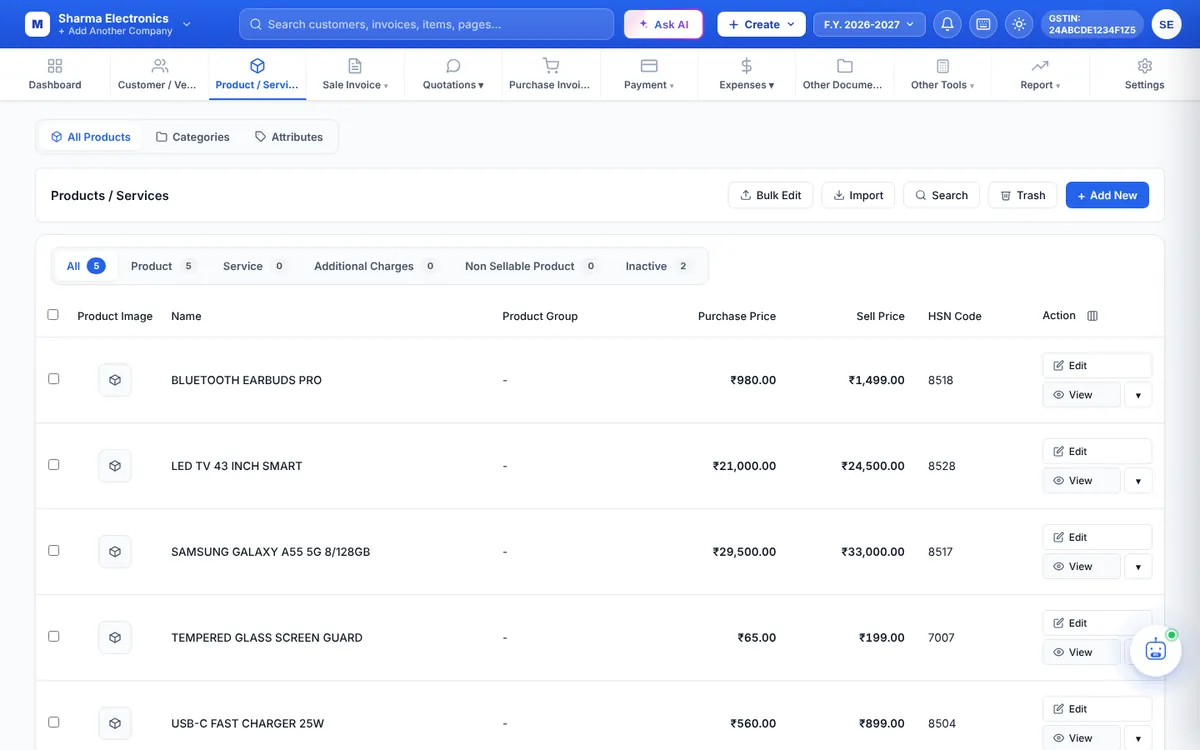
Find products
- Tabs: All, Product, Service, Additional Charges, Non Sellable Product and Inactive.
- Search: filter by Product Name, Product Note, HSN Code, Product Group and Stock Type.
- Advance Filter: build conditions on Product Name, HSN Code, Barcode, Group, Unit, Sell Price, Purchase Price or Product Note — including greater than and less than for prices.
- Column chooser (next to Action): show Current Stock, prices including tax, UOM, Tax, Status and more.
Actions
- View opens a side panel with all details: pricing, tax, group, low-stock level, images, stored serial numbers and more, with an Edit button.
- Edit opens the product form.
- ▾ → Delete moves the product to the Trash. Tick several rows and use Delete Selected to delete in bulk.
- Trash shows deleted products so you can restore them.
Inactive products
Products whose Enable box is unticked are listed under Inactive and are hidden from new documents. When Auto-disable out-of-stock items for sale is on, items at zero stock are switched off automatically and switched back on when you restock them. Product & Stock Options