












Welcome to Billing Saathi: what you can do
Billing Saathi is an online GST billing, inventory and accounting app for small and growing businesses. It runs in your web browser at app.billingsaathi.com on a computer, tablet or phone — there is nothing to install.
It works for any type of business: retail shops, mobile and electronics shops, wholesalers, manufacturers, service businesses, restaurants, medical stores and grocery shops. Features like IMEI tracking or batch numbers are optional — switch them on only for the products that need them.
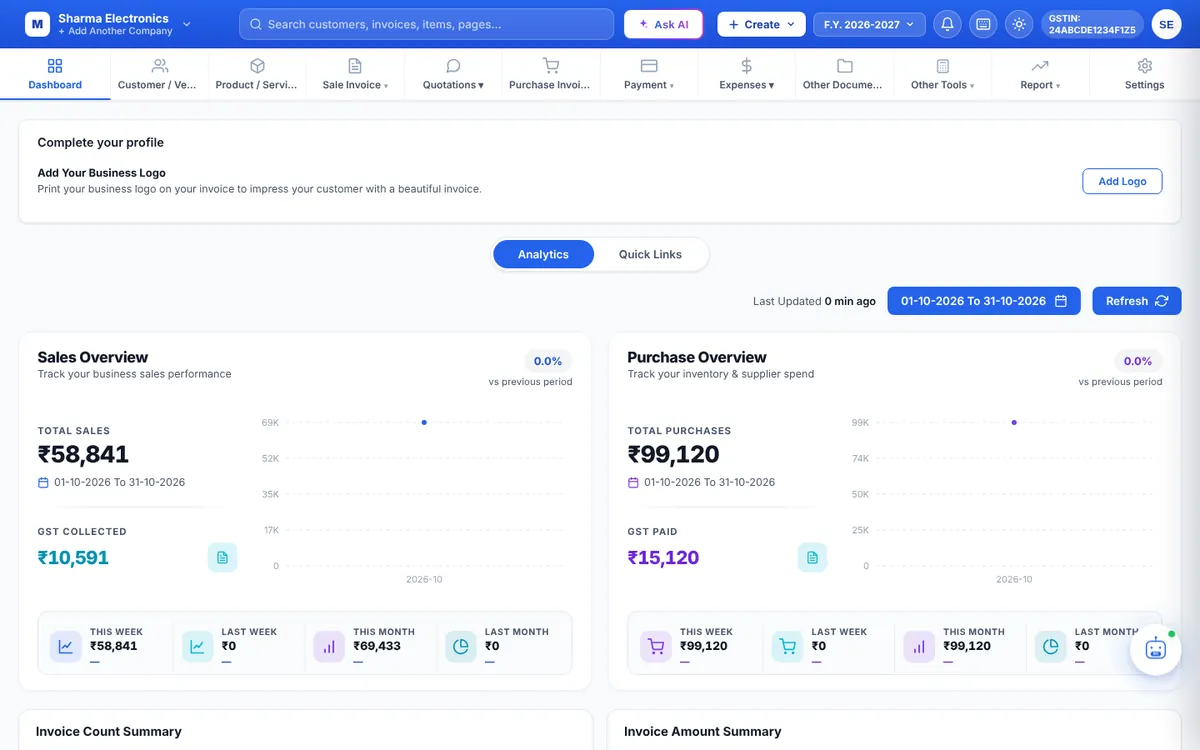
What you can do with Billing Saathi
| Section | What it is for |
|---|---|
| Dashboard | Sales, purchases, outstanding amounts, low stock, top products and recent activity at a glance. |
| Customer / Vendor | Your parties with GSTIN, addresses, opening balance, credit limit and groups. |
| Product / Service | Your catalogue with HSN/SAC, GST rate, prices, stock, IMEI/serial or batch tracking, price lists and barcode labels. |
| Sale Invoice | GST tax invoices, sale orders, credit notes, sale outstanding and the sale product report. |
| Quotations | Quotations, delivery challans and packing lists. |
| Purchase Invoice | Supplier bills, purchase orders, debit notes, purchase outstanding and the purchase product report. |
| Payment | Money received from customers (Inward Payment) and money paid to suppliers (Outward Payment). |
| Expenses | Daily expenses, other income and salary (employees, attendance, payroll and advances). |
| Other Documents | Letters, proforma invoices, job work, manufacturing, multi-currency (export) invoices, service requests and the company ledger. |
| Other Tools | Calculators for EMI, TDS, depreciation, advance tax, margin & markup and late-payment interest. |
| Report | Sales and purchase registers, GST report, GSTR-1, GSTR-2B, GSTR-3B, cashbook, day book, profit reports, stock reports, e-way bills and more. |
| Settings | Business profile, bank & UPI, numbering, print templates, colours, language, backups and security. |
GST made simple
- Every invoice line carries an HSN/SAC code, GST rate and taxable value.
- CGST + SGST is applied for sales inside your state and IGST for sales to another state, based on the Place of Supply.
- At month end, the GST Report, GSTR-1 and GSTR-3B are already worked out from your bills. Always check the figures with your accountant before filing.
Free plan and Premium
You can use Billing Saathi on the Free plan as long as you like. Premium unlocks extra sections such as Expenses, Other Documents and Reports. Every new account can try Premium free once — see Free plan vs Premium.
Where to start
Tip: Billing Saathi has a dark mode, and you can change its colours and hide tabs you don’t use. See Theme, colours and tabs.