












How can we help?
Record daily expenses
Record every business expense — rent, electricity, fuel, stationery, tea and snacks — so your cashbook, day book and profit reports are complete.
Where to find it: Expenses ▾ → Daily Expense (keyboard Alt + A). This is a Premium section.
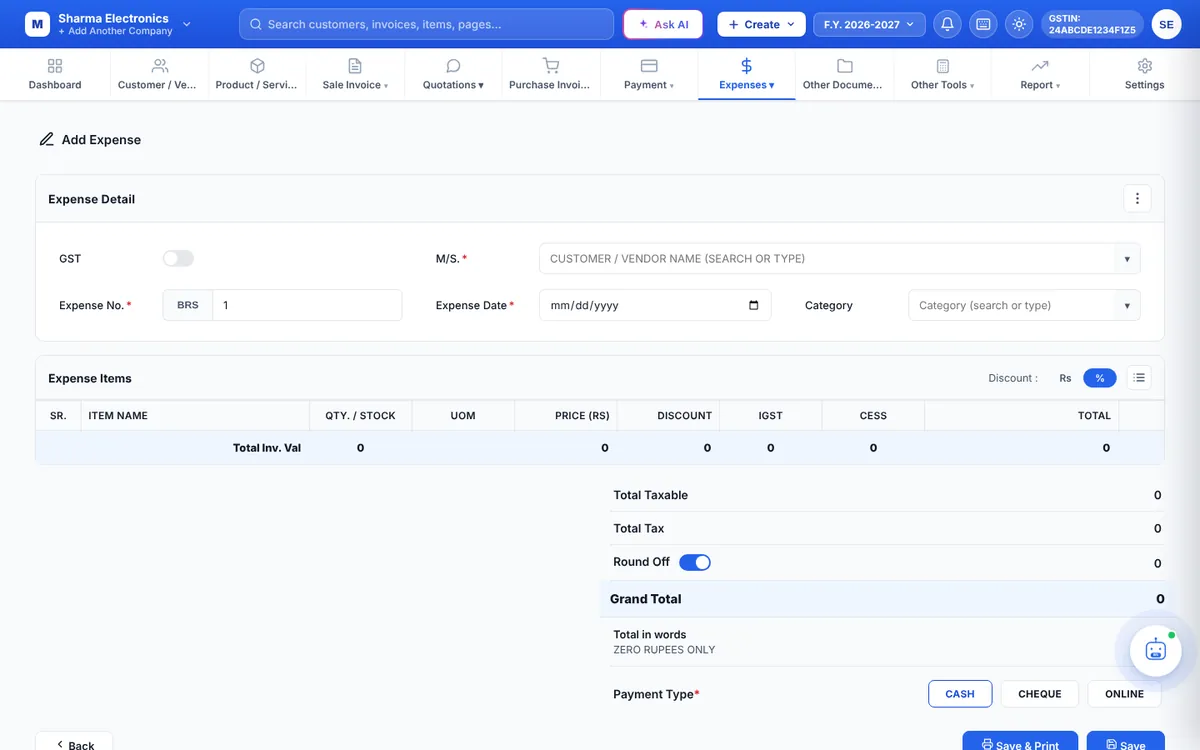
Add an expense
- Click + Add New. The Add Expense page opens.
- In M/S. choose or type who you paid (vendor, landlord, electricity board…).
- Check the Expense No., set the Expense Date and choose or type a Category (for example Electricity).
- If the bill has GST you can claim, switch on GST.
- In Expense Items add what you paid for, with quantity and price. Use Manage Columns to show UOM, Discount, IGST and CESS columns when needed.
- Check the Grand Total (round off is applied automatically when switched on).
- Choose the Payment Type — CASH, CHEQUE or ONLINE — and click Save or Save & Print.
The expense list
- Switch between Today, This Month, This Year and All Time.
- Search finds expenses by category, note or paid-to.
- Summary shows totals; the column icon chooses which columns to show.
- Each row has View / Print (prints an expense voucher), edit and delete. Tick several rows and click Trash Selected to remove them; restore them from Trash.
Tip: Use the same category names every time (or set them up in Expense categories) so the Daily Expenses report can total them properly.